Friday, May 29, 2015

SOAP UI On Linux 64 Bit


[user@host1 soapui]$ ls
ReadyAPI-x64-1.3.0.sh
[user@host1 soapui]$ chmod u+x ReadyAPI-x64-1.3.0.sh
[user@host1 soapui]$ ./ReadyAPI-x64-1.3.0.sh
Unpacking JRE ...
Preparing JRE ...
Starting Installer ...
This will install Ready! API 1.3.0 on your computer.
OK [o, Enter], Cancel [c]
I accept the agreement
Yes [1], No [2]
1
Where should install tutorials?
[/home/celapp]
/opt/SmartBear/                                         
Create symlinks?
Yes [y, Enter], No [n]
y
Select the folder where you would like Ready! API 1.3.0 to create symlinks, then click Next.
[/usr/local/bin]

Create a desktop icon?
Yes [y, Enter], No [n]
y
Extracting files ...
                                                                           
Setup has finished installing Ready! API 1.3.0 on your computer.
Run Ready! API 1.3.0?
Yes [y, Enter], No [n]
y
View Release Notes http://readyapi.smartbear.com/release_notes/readyapi/latest
Finishing installation ...

Monday, May 11, 2015

How to test REST service from CURL


Here is the command to test the REST from curl


curl -i -H "Content-Type: application/json" -X POST -d '{"firstName": "Harish"} ' http://ussumsdsoaapp04:7001/hellorest/

If you need to pass the request payload from a file then use @filenamme 

curl -i -H "Content-Type: application/json" -X POST -d @hello.json http://ussumsdsoaapp04:7001/hellorest/

Content of  hello.json 

{"firstName": "Harish"}

Thursday, April 30, 2015

API Gateway -LDAPS with Active Directory


Error -
ested fault: simple bind failed: devad.mycompay.com:636: javax.naming.CommunicationException: simple bind failed: devad.mycompay.com:636 [Root exception is javax.net.ssl.SSLHandshakeException: sun.security.validator.ValidatorException: PKIX path building failed: sun.security.provider.certpath.SunCertPathBuilderException: unable to find valid certification path to requested target] at com.sun.jndi.ldap.LdapClient.authenticate(LdapClient.java:197) at com.sun.jndi.ldap.LdapCtx.connect(LdapCtx.java:2694) at com.sun.jndi.ldap.LdapCtx.<init>(LdapCtx.java:293) at com.sun.jndi.ldap.LdapCtxFactory.getUsingURL(LdapCtxFactory.java:175) at com.sun.jndi.ldap.LdapCtxFactory.getUsingURLs(LdapCtxFactory.java:193) at com.sun.jndi.ldap.LdapCtxFactory.getLdapCtxInstance(LdapCtxFactory.java:136) at com.sun.jndi.ldap.LdapCtxFactory.getInitialContext(LdapCtxFactory.java:66) at javax.naming.spi.NamingManager.getInitialContext(NamingManager.java:667) at javax.naming.InitialContext.getDefaultInitCtx(InitialContext.java:288) at javax.naming.InitialContext.init(InitialContext.java:223) at javax.naming.InitialContext.<init>(InitialContext.java:197) at javax.naming.directory.InitialDirContext.<init>(InitialDirContext.java:82) at com.vordel.common.ldap.LdapLookup$CachedContext.<init>(LdapLookup.java:239) at com.vordel.common.ldap.LdapLookup$ContextCache.factory(LdapLookup.java:255) at com.vordel.common.ldap.LdapLookup$ContextCache.factory(LdapLookup.java:247) at com.vordel.system.PoolCache.hold(PoolCache.java:37) at com.vordel.common.ldap.LdapLookup$InContext.runCached(LdapLookup.java:176) at com.vordel.common.ldap.LdapLookup$InContext.run(LdapLookup.java:158) at com.vordel.common.ldap.LdapLookup.search(LdapLookup.java:540) at com.vordel.common.ldap.LdapLookup.search(LdapLookup.java:505) at com.vordel.circuit.attribute.AttribLdapLookup.getAttributes(AttribLdapLookup.java:155) at com.vordel.circuit.attribute.AttributeExtractLdapProcessor.getAttributes(AttributeExtractLdapProcessor.java:122) at com.vordel.circuit.attribute.AttributeExtractBaseProcessor.invoke(AttributeExtractBaseProcessor.java:149) at com.vordel.circuit.InvocationEngine.invokeFilter(InvocationEngine.java:160) at com.vordel.circuit.InvocationEngine.invokeCircuit(InvocationEngine.java:52) at com.vordel.circuit.InvocationEngine.processMessage(InvocationEngine.java:241) at com.vordel.circuit.SyntheticCircuitChainProcessor.invoke(SyntheticCircuitChainProcessor.java:36) at com.vordel.dwe.http.HTTPPlugin.invokeDispose(HTTPPlugin.java:300) at com.vordel.dwe.http.HTTPPlugin.invoke(HTTPPlugin.java:166) Caused by: javax.net.ssl.SSLHandshakeException: sun.security.validator.ValidatorException: PKIX path building failed: sun.security.provider.certpath.SunCertPathBuilderException: unable to find valid certification path to requested target at com.sun.net.ssl.internal.ssl.Alerts.getSSLException(Alerts.java:174) at com.sun.net.ssl.internal.ssl.SSLSocketImpl.fatal(SSLSocketImpl.java:1649) at com.sun.net.ssl.internal.ssl.Handshaker.fatalSE(Handshaker.java:241) at com.sun.net.ssl.internal.ssl.Handshaker.fatalSE(Handshaker.java:235) at com.sun.net.ssl.internal.ssl.ClientHandshaker.serverCertificate(ClientHandshaker.java:1206) at com.sun.net.ssl.internal.ssl.ClientHandshaker.processMessage(ClientHandshaker.java:136) at com.sun.net.ssl.internal.ssl.Handshaker.processLoop(Handshaker.java:593) at com.sun.net.ssl.internal.ssl.Handshaker.process_record(Handshaker.java:529) at com.sun.net.ssl.internal.ssl.SSLSocketImpl.readRecord(SSLSocketImpl.java:893) at com.sun.net.ssl.internal.ssl.SSLSocketImpl.performInitialHandshake(SSLSocketImpl.java:1138) at com.sun.net.ssl.internal.ssl.SSLSocketImpl.readDataRecord(SSLSocketImpl.java:753) at com.sun.net.ssl.internal.ssl.AppInputStream.read(AppInputStream.java:75) at java.io.BufferedInputStream.fill(BufferedInputStream.java:218) at java.io.BufferedInputStream.read1(BufferedInputStream.java:258) at java.io.BufferedInputStream.read(BufferedInputStream.java:317) at com.sun.jndi.ldap.Connection.run(Connection.java:808) at java.lang.Thread.run(Thread.java:662) Caused by: sun.security.validator.ValidatorException: PKIX path building failed: sun.security.provider.certpath.SunCertPathBuilderException: unable to find valid certification path to requested target at sun.security.validator.PKIXValidator.doBuild(PKIXValidator.java:323) at sun.security.validator.PKIXValidator.engineValidate(PKIXValidator.java:217) at sun.security.validator.Validator.validate(Validator.java:218) at com.sun.net.ssl.internal.ssl.X509TrustManagerImpl.validate(X509TrustManagerImpl.java:126) at com.sun.net.ssl.internal.ssl.X509TrustManagerImpl.checkServerTrusted(X509TrustManagerImpl.java:209) at com.sun.net.ssl.internal.ssl.X509TrustManagerImpl.checkServerTrusted(X509TrustManagerImpl.java:249) at com.sun.net.ssl.internal.ssl.ClientHandshaker.serverCertificate(ClientHandshaker.java:1185) ... 12 more Caused by: sun.security.provider.certpath.SunCertPathBuilderException: unable to find valid certification path to requested target at sun.security.provider.certpath.SunCertPathBuilder.engineBuild(SunCertPathBuilder.java:174) at java.security.cert.CertPathBuilder.build(CertPathBuilder.java:238) at sun.security.validator.PKIXValidator.doBuild(PKIXValidator.java:318) ... 18 more

Solution
1. Add the Root certificate of the Active Directory in java keystore cacerts . Keystore cacerts is located in following directory.
/opt/oracle/OAG-11.1.2.1.0/apigateway/Linux.x86_64/jre/lib/security/

Command to import -
keytool -import -trustcacerts -alias ADRoot -file CelgeneCertificates/RootIntCA.cer -keystore cacerts


2. 
Restarts the gateway servers

Start Admin Node Manager:
/opt/oracle/OAG-11.1.2.1.0/apigateway/posix/bin/nodemanager -d

Stop:

/opt/oracle/OAG-11.1.2.1.0/apigateway/posix/bin/nodemanager -k


Stop API Gateway Server

/opt/oracle/OAG-11.1.2.1.0/apigateway/posix/bin/startinstance -g "DevGroup1" -n "DevGateway1" -k

/opt/oracle/OAG-11.1.2.1.0/apigateway/posix/bin/startinstance -g "DevGroup1" -n "DevGateway1" -d

Wednesday, April 29, 2015

How To Extract File having tar.gz file


For example you need to set-up the Apache LDAP explorer and you downloade the file "ApacheDirectoryStudio-linux-x86_64-2.0.0.v20130628.tar.gz"


So first step:
gzip -d ApacheDirectoryStudio-linux-x86_64-2.0.0.v20130628.tar.gz
This will create the  "ApacheDirectoryStudio-linux-x86_64-2.0.0.v20130628.tar" file

Second step: tar command

tar -xvf ApacheDirectoryStudio-linux-x86_64-2.0.0.v20130628.tar

Sunday, February 22, 2015

JDev 12c installation


1) Download the "Oracle SOA Suite" from OTN Release 12c (12.1.3.0.0) . Downloade zip file name is "jsonedit-repository-0.9.7.zip" 

http://www.oracle.com/technetwork/middleware/soasuite/downloads/index.html

2) Extract the file and it will have two jar files .

drwxr-xr-x 2 harish hgroup       4096 Feb 22 09:32 jsonedit-repository-0.9.7

[celapp@myhost Jdev]$ cd jsonedit-repository-0.9.7/

[myhost@myhost jsonedit-repository-0.9.7]$ ls
fmw_12.1.3.0.0_soa_quickstart2.jar  fmw_12.1.3.0.0_soa_quickstart.jar

[myhost@myhost jsonedit-repository-0.9.7]$ java -jar -Xms4g fmw_12.1.3.0.0_soa_quickstart.jar 

Launcher log file is /tmp/OraInstall2015-02-22_09-50-41AM/launcher2015-02-22_09-50-41AM.log.
Insufficient free space in /tmp/orcl6637823415702905917.tmp to extract the installer.  Actual 2691 MB.  Required 3053 MB.

[myhost@myhost jsonedit-repository-0.9.7]$ java -jar -Djava.io.tmpdir=/opt/tmp/tmp -Xms4g fmw_12.1.3.0.0_soa_quickstart.jar 
Launcher log file is /opt/tmp/tmp/OraInstall2015-02-22_09-53-47AM/launcher2015-02-22_09-53-47AM.log.
Extracting files................................
Starting Oracle Universal Installer

Checking if CPU speed is above 300 MHz.   Actual 2128.002 MHz    Passed
Checking monitor: must be configured to display at least 256 colors.   Actual 16777216    Passed
Checking swap space: must be greater than 512 MB.   Actual 8388600 MB    Passed
Checking if this platform requires a 64-bit JVM.   Actual 64    Passed (64-bit not required)
Checking temp space: must be greater than 300 MB.   Actual 18121 MB    Passed


Preparing to launch the Oracle Universal Installer from /opt/tmp/tmp/OraInstall2015-02-22_09-53-47AM
Log: /opt/tmp/tmp/OraInstall2015-02-22_09-53-47AM/install2015-02-22_09-53-47AM.log
You can find the log of this install session at:
 /opt/tmp/tmp/OraInstall2015-02-22_09-53-47AM/install2015-02-22_09-53-47AM.log

 Oracle JDeveloper 12c 12.1.3.0.0
 Copyright (c) 1997, 2014, Oracle and/or its affiliates. All rights reserved.

Logs successfully copied to /home/myhost/oraInventory/logs.
[myhost@myhost jsonedit-repository-0.9.7]$ 


Saturday, February 14, 2015

API Gateway Certificate Import -Can Not decode x509 object


Importing the certificate in Oracle API gateway


We received the self signed certificate from our partner and while importing in API gateway we received the Error 
"Can Not decode x509 object"


The simple way to resolve this issue  is to use Windows "Certificate Export Wizard" and choose copy to file option .
 In Export File format export screen choose "DER Encoded binary X.509 (.CER).


 Use this exported .cer file to successfully import the certificate.


- 

Friday, May 30, 2014

API Gateway How to condition a result based on some JSON data


problem:

We need to develop the policy routing flow based on the incoming message What is the way to do the content based routing and condition based routing in OAG. 

For example I have two (may be more) types of JSON message response from a service . I want to set the message based on the JSON response from service . What is the way to develop in this in OAG. . 

Here is the two JOSN response from service that OAG is calling . 

JSOA Type-1 
========================================== 
{"soapenv:Envelope":{"@xmlns:soapenv":"http://schemas.xmlsoap.org/soap/envelope/","env:Header":{"@xmlns:env":"http://schemas.xmlsoap.org/soap/envelope/","wsse:Security":{"@xmlns:wsse":"http://docs.oasis-open.org/wss/2004/01/oasis-200401-wss-wssecurity-secext-1.0.xsd"}},"env:Body":{"@xmlns:env":"http://schemas.xmlsoap.org/soap/envelope/","mes:createUserAccountResponse":{"@xmlns:mes":"http://celgene.com/security/messages_v2","mes:createUserAccountOutput":{"mes:status":"SUCCESS"}}}}} 

JSON Type-2 
========================================== 
{"soapenv:Envelope": {"@xmlns:soapenv": "http://schemas.xmlsoap.org/soap/envelope/", "env:Header": {"@xmlns:env": "http://schemas.xmlsoap.org/soap/envelope/"}, "env:Body": {"@xmlns:env": "http://schemas.xmlsoap.org/soap/envelope/", "env:Fault": {"@xmlns:xs": "http://www.w3.org/2001/XMLSchema", "@xmlns:xsi": "http://www.w3.org/2001/XMLSchema-instance", "faultcode": "soapenv:Server", "faultstring": null, "detail": {"java:UserAlreadyExistsException": {"@xmlns:java": "http://celgene.com/security/exceptions_v2", "java:message": "UserAlreadyExists" }}}}} 


For JSON Msg 1 I want to set the message 
========================================== 
{"Message": "User Created successfully"} 

For JSON Msg 2 I want to set the message 
========================================== 
{"Message": "UserAlreadyExists"} 
SOLUTION:


We can implement this using the Scripting Language filter as follows: 

function invoke(msg) { 

// get the body as JsonNode 
var node = com.vordel.mime.JSONBody.getJSON(msg); 

// get the root 
var root = node.path("soapenv:Envelope"); 

// get the value of reference from body 
var envBody = root.path("env:Body"); 

// get the value of reference from Fault 
var envFault = envBody.path("env:Fault"); 

if (envFault .size() != 0) 
{ 
// Follow the line for the message with error 
// get the value of reference from detail 
var detail = envFault.path("detail"); 

// get the value of reference from UserAlreadyExistsException 
var javaUser = detail.path("java:UserAlreadyExistsException"); 

// get the value of reference from message 
var javaMessage = javaUser.path("java:message"); 

// get the text value 
var message = javaMessage.getTextValue(); 

// put the data in the result 
msg.put("message", "UserAlreadyExists"); 
return true; 
} 

// get the value of reference from createUserAccountResponse 
var mesCreateUserAccountResponse = envBody.path("mes:createUserAccountResponse"); 
if (mesCreateUserAccountResponse .size() !=0) 
{ 
// Follow the line for the Success 


// get the value of reference from mesCreateUserAccountResponse 
var mesCreateUserAccountOutput = mesCreateUserAccountResponse.path("mes:createUserAccountOutput"); 

// get the value of reference from mesCreateUserAccountOutput 
var mesStatus = mesCreateUserAccountOutput.path("mes:status"); 

// get the text value 
var message = mesStatus.getTextValue(); 

// put the data in the result 
msg.put("message", "User Created successfully"); 

return true; 
} 
} 


Friday, May 16, 2014

How to convert file format from ASCII to UTF


How to convert file format from ASCII to UTF

#1 : Check the file format
$file input.txt

#2
use the iconv command
iconv -f   <<Source Format >>    -t      <<Target Format>>   < input.txt   > output.txt

iconv -f ASCII  -t UTF8   < input.txt   > output.txt

#3 #1 : Check the file format
$file output.txt

Tuesday, May 13, 2014

Error -ora-28267: invalid namespace -ADF With Jdeveloper


There was a requirement to validated the Local Entity Attribute value against the Remote Database. For this we set-up the DB link. Local DB is 11g and remote is 10g.
During the query validation in JDEV we go the issue."ora-28267: invalid namespace" .

To Fix this in JDV.

Replaced the jar file  (ojdbc6dms.jar) with ojdbc6.jar in below loaction in Jdeveloper..

"C:\Oracle\Middleware11.1.1.7.0\oracle_common\modules\oracle.jdbc_11.1.1\"

You can find ojdbc6.jar in  C:\Oracle\Middleware11.1.1.7.0\wlserver_10.3\server\lib

C:\Oracle\Middleware11.1.1.7.0\=Middleware Home

Thursday, January 23, 2014

WebLogic Server : Node Manager

Issue Reported : On Admin server "Servers" link was not loading the servers page. I tail the nohup.out but logs are not flowing . All other links were working fine  except "Servers" link.
Did a thread dump found SSL was not established.

[ACTIVE] ExecuteThread: '9' for queue: 'weblogic.kernel.Default (self-tuning)'" daemon prio=10 tid=0x00007f6d34011000 nid=0x1cfc runnable [0x00007f6d268e4000]
   java.lang.Thread.State: RUNNABLE
        at java.net.SocketInputStream.socketRead0(Native Method)
        at java.net.SocketInputStream.read(SocketInputStream.java:129)
        at weblogic.utils.io.ChunkedInputStream.read(ChunkedInputStream.java:159)
        at java.io.InputStream.read(InputStream.java:85)
        at com.certicom.tls.record.ReadHandler.readFragment(Unknown Source)
        at com.certicom.tls.record.ReadHandler.readRecord(Unknown Source)
        at com.certicom.tls.record.ReadHandler.readUntilHandshakeComplete(Unknown Source)
        at com.certicom.tls.interfaceimpl.TLSConnectionImpl.completeHandshake(Unknown Source)
        - locked <0x00007f6d9ad86ac8> (a com.certicom.tls.interfaceimpl.TLSConnectionImpl)
        at com.certicom.tls.record.WriteHandler.write(Unknown Source)
        at com.certicom.io.OutputSSLIOStreamWrapper.write(Unknown Source)
        at sun.nio.cs.StreamEncoder.writeBytes(StreamEncoder.java:202)
        at sun.nio.cs.StreamEncoder.implFlushBuffer(StreamEncoder.java:272)
        at sun.nio.cs.StreamEncoder.implFlush(StreamEncoder.java:276)
        at sun.nio.cs.StreamEncoder.flush(StreamEncoder.java:122)
        - locked <0x00007f6d9ad86c20> (a java.io.OutputStreamWriter)
        at java.io.OutputStreamWriter.flush(OutputStreamWriter.java:212)
        at java.io.BufferedWriter.flush(BufferedWriter.java:236)
        - locked <0x00007f6d9ad86c20> (a java.io.OutputStreamWriter)
        at weblogic.nodemanager.common.DataFormat.writeCommand(DataFormat.java:247)
        at weblogic.nodemanager.client.NMServerClient.sendCmd(NMServerClient.java:318)
        at weblogic.nodemanager.client.NMServerClient.sendHello(NMServerClient.java:128)
        at weblogic.nodemanager.client.NMServerClient.connect(NMServerClient.java:239)
        at weblogic.nodemanager.client.NMServerClient.checkConnected(NMServerClient.java:200)
        at weblogic.nodemanager.client.NMServerClient.getState(NMServerClient.java:37)
        - locked <0x00007f6d9ad86cd8> (a weblogic.nodemanager.client.SSLClient)
        at weblogic.nodemanager.mbean.NodeManagerRuntime.getState(NodeManagerRuntime.java:438)
        at weblogic.nodemanager.mbean.NodeManagerRuntime.getState(NodeManagerRuntime.java:457)
        at weblogic.server.ServerLifeCycleRuntime.getStateNodeManager(ServerLifeCycleRuntime.java:752)
        at weblogic.server.ServerLifeCycleRuntime.getState(ServerLifeCycleRuntime.java:584)

Wednesday, January 8, 2014

OAG - Oracle API Gateway- How to turn off Host name verification


Issue :
While consuming the HTTPS services sometime the certificate presented by the Remote Host has  identity  does not match with the host name or IP given in the service URL. In this case OAG will throw the below error

host name 'services.harish.com' in request does not match server's certificate subject { subject: /C=US/ST=NJ/L=Hillsborough/O=SOA/OU=IT/CN=Harish }.
ERROR  1/8/14 16:56:52.601                 [SSL alert write 0x22a, 0x1131]: bad certificate [fatal] { subject: /C=US/ST=NJ/L=Hillsborough/O=SOA/OU=IT/CN=Harish }.
ERROR  1/8/14 16:56:52.601                 [SSL_connect, 0x1131]: error - certificate rejected { subject:/C=US/ST=NJ/L=Hillsborough/O=SOA/OU=IT/CN=Harish }.
ERROR  1/8/14 16:56:52.601                 [SSL_connect, 0x1131]: error - certificate rejected.
ERROR  1/8/14 16:56:52.601                 transient failure connecting to remote: SSL protocol error
ERROR  1/8/14 16:56:52.601         The message [Id-3faba97a52cdc9a40f000000] logged Failure at 01.08.2014 16:56:52,601 with log description: Failed to route request to endpoint.
ERROR  1/8/14 16:56:52.602         Filter that caused failure: Connect to URL
ERROR  1/8/14 16:56:52.602         Policy '/harish/try.asmx' {


 Solution :

Navigate to " Remote Host Settings" Dialog box  (Remote Host name ->Edit)
Unchecked the check box - for   "Verify Server's Certificate matches requested hostname" . This is selected by default.


This is the screenshot for OAG-11.1.2.1.0's policy studio.


Sunday, January 5, 2014

Data Source Configuration For ADF application

I developed the ADF application and this was working fine  . Then I decided to point the application to other database environment and this i was trying to update the Data source configuration that get craeted on wEBlOGIC SERVER by jdeveloper. But this was throwing error.

JDBCDriverParams/Properties/Properties[user]) due to 'Unable to remove bean since not defined in plan'. The remover should first check to see if the bean is removable in the deployment plan prior to removing it
Steps to resolve the issue:

1) Right Click to Application Module in Jdev->Configurations..>Select the ModuleLocal->Select the property "JDBCDataSource" and click Edit. -> In the "Edit Business Configuration Components" Diaglog box select the Connection Typer JDBC DataSource and enter the JNDI Data source name..
Please note this Data source needs to be created before you deploy your application.
2) Now deploy you application from Jdeveloper and your application will connect via JNDI datsource you configure.
The data source modue that is bundled will have the JDDI data source but they will be in shutdown state.

3) Now you can edit your JNDI data source without any issue for other environmnet.


SOAP Version Mismatch between Consumer and Publisher


While consuming the SOAP service I got the below error . This took me couple of minutes to figure out so thought of sharing may be this can save some minutes .


Error 1:

 <?xml version="1.0" encoding="UTF-8"?><soap:Envelope xmlns:soap="http://www.w3.org/2003/05/soap-envelope"><soap:Body>
<pnd:ConvertPNG2PDFResponse xmlns:pnd="http://mycompany.com/middleware/utility/conversion/pnd2pdf"><ser:ResponseHeader xmlns:ser="http://mycompany.com/middleware/schemas/servicemetadata_v1"><ser:StatusCode>1</ser:StatusCode><ser:Status>ERROR</ser:Status><ser:MessageCode>OSB-UNREG-ERR</ser:MessageCode><ser:Message>
This error is not registered in the system. Please Contact system administrator.BEA-382032-The message must be an instance of: {http://www.w3.org/2003/05/soap-envelope}Envelope
</ser:Message>
</ser:ResponseHeader>
</pnd:ConvertPNG2PDFResponse>
</soap:Body></soap:Envelope>

Error 2:

Response SOAP Message = <?xml version="1.0" encoding="UTF-8"?><soapenv:Envelope xmlns:soapenv="http://schemas.xmlsoap.org/soap/envelope/"><soapenv:Body><soapenv:Fault><faultcode>soapenv:VersionMismatch</faultcode><faultstring>BEA-382032: The message must be an instance of: {http://schemas.xmlsoap.org/soap/envelope/}Envelope</faultstring><detail><con:fault xmlns:con="http://www.bea.com/wli/sb/context"><con:errorCode>BEA-382032</con:errorCode><con:reason>
The message must be an instance of: {http://schemas.xmlsoap.org/soap/envelope/}Envelope</con:reason><con:details><err:InvalidEnvelope xmlns:err="http://www.bea.com/wli/sb/errors"><err:localpart>Envelope</err:localpart><err:namespace>http://www.w3.org/2003/05/soap-envelope</err:namespace></err:InvalidEnvelope></con:details><con:location><con:path>request-pipeline</con:path></con:location></con:fault></detail></soapenv:Fault></soapenv:Body></soapenv:Envelope>

Solution : while creating the MessageFactory object please use the correct arguments based on the published service if this is SOAP 1.1 or 1.2

Please refer the below for more information
Open Declaration

A factory for creating SOAPMessage objects.
A SAAJ client can create a MessageFactory object using the method newInstance, as shown in the following lines of code.
       MessageFactory mf = MessageFactory.newInstance();
       MessageFactory mf12 = MessageFactory.newInstance(SOAPConstants.SOAP_1_2_PROTOCOL);
 
All MessageFactory objects, regardless of how they are created, will produce SOAPMessage objects that have the following elements by default:
  • A SOAPPart object
  • A SOAPEnvelope object
  • A SOAPBody object
  • A SOAPHeader object
In some cases, specialized MessageFactory objects may be obtained that produce messages prepopulated with additional entries in the SOAPHeader object and the SOAPBody object. The content of a new SOAPMessage object depends on which of the two MessageFactory methods is used to create it.
  • createMessage()
    This is the method clients would normally use to create a request message.
  • createMessage(MimeHeaders, java.io.InputStream) -- message has content from the InputStream object and headers from the MimeHeaders object
    This method can be used internally by a service implementation to create a message that is a response to a request.  

JAVA Code To Consume the HTTPS SOAP Service - Certificate Based Client Authentication


JAVA Code To Consume the HTTPS SOAP Service - Certificate Based Client Authentication 


Step 1 : Create the keys for the client  and generate the certificate . This way you will have your identity .This way you will present your certificate to server and server will authenticate based on client certificate.  You must supply your certificate as server will have your certificate in its trust.
Step 2: Store the server certificate in trust keystore.  This way you will trust the server.

Step 3: Set the below arguments in client JVM 
-Djavax.net.debug=ssl
-Djavax.net.ssl.keyStoreType=JKS
-Djavax.net.ssl.keyStore=C:/identity/identity/laptopIdentity.jks
-Djavax.net.ssl.keyStorePassword=xxxxx
-Djavax.net.ssl.trustStoreType=jks
-Djavax.net.ssl.trustStore=C:/identity/identitytruststore.jks


Step 4 : customize the below java code as per your WSDL.

WSDL URL : //https://myhost/ServiceProxy?wsdl


package com.test;

import java.net.URL;

import javax.net.ssl.HostnameVerifier;
import javax.net.ssl.HttpsURLConnection;
import javax.net.ssl.SSLSession;
import javax.xml.soap.*;
import javax.xml.transform.*;
import javax.xml.transform.stream.*;

public class SOAPJavaClient {

/**
* Starting function to test the soap service
*/
public static void main(String args[]) {
              // Service URL ,Remove "?wsdl" from the WSDL URL.
String https_url = "https://myhost/ServiceProxy";

URL url;

try {
// Create SOAP Connection
SOAPConnectionFactory soapConnectionFactory = SOAPConnectionFactory
.newInstance();
SOAPConnection soapConnection = soapConnectionFactory
.createConnection();

// Send SOAP Message to SOAP Server

url = new URL(https_url);
HttpsURLConnection con = (HttpsURLConnection) url.openConnection();
                      //Use below (2 lines) if Host name verification needs to turned off
MyHostnameVerifier HostVerifier = new MyHostnameVerifier();
con.setHostnameVerifier(HostVerifier);
con.connect();

SOAPMessage response = soapConnection.call(createRequest(),url);


// Print the  SOAP Response
printResponse (response );

soapConnection.close();
} catch (Exception e) {
System.err
.println("Error occurred while sending SOAP Request to Server");
e.printStackTrace();
}
}

private static SOAPMessage createRequest() throws Exception {
// SOAP 1.1 Services
MessageFactory messageFactory = MessageFactory.newInstance();
// For SOAP 1.2 services
// MessageFactory messageFactory =
// MessageFactory.newInstance(SOAPConstants.SOAP_1_2_PROTOCOL);

SOAPMessage soapMessage = messageFactory.createMessage();
SOAPPart soapPart = soapMessage.getSOAPPart();

// String serverURI = "myhost";

// SOAP Envelope
SOAPEnvelope envelope = soapPart.getEnvelope();

envelope.addNamespaceDeclaration("ns1",
"https://myhost/ServiceProxy");

SOAPBody soapBody = envelope.getBody();
SOAPElement soapBodyElem = soapBody.addChildElement(
"OperationRequest", "ns1");

SOAPElement soapBodyElem1 = soapBodyElem
.addChildElement("ID");

soapBodyElem1.addTextNode("1");

MimeHeaders headers = soapMessage.getMimeHeaders();
headers.addHeader("SOAPAction",
"http://myhost/Operation");

soapMessage.saveChanges();

/* Print the request message */
System.out.print("Request SOAP Message = ");
soapMessage.writeTo(System.out);
System.out.println();
return soapMessage;
}

/**
* Method used to print the SOAP Response
*/
private static void printResponse(SOAPMessage soapResponse)
throws Exception {
TransformerFactory transformerFactory = TransformerFactory
.newInstance();
Transformer transformer = transformerFactory.newTransformer();
Source sourceContent = soapResponse.getSOAPPart().getContent();
System.out.print("\nResponse SOAP Message = ");
StreamResult result = new StreamResult(System.out);
transformer.transform(sourceContent, result);
}

}
//  This code is used when the server certificate 's CN is different than host name or IP.
class MyHostnameVerifier implements HostnameVerifier {
public boolean verify(String hostname, SSLSession session) {
if (hostname.equals("hostame or IP of the from WSDL"))
return true;
else
return false;
}
}


Let me know if you have any issue . 

Monday, April 1, 2013

Testing the Web Service secured by “Client Certificate” Authentication via SOAP UI.


Client Key generation and exporting the public certificate


1)  Generate the Self Sign certificate or get the certificate from some vendor. We will discuss the steps to generate the Self  Sign certificates
                   A)  Set the java class path to run the keytool
                   B)  Use the below to generate the keys
C:\ identity>keytool -genkey -alias tesclient -keyalg RSA -keystore  SSKeystore.jks
Enter keystore password: XXXXX
Re-enter new password: XXXXX
What is your first and last name?
  [Unknown]:  consumer
What is the name of your organizational unit?
  [Unknown]:  SOA
What is the name of your organization?
  [Unknown]:  MyCompany
What is the name of your City or Locality?
  [Unknown]:  Hillsborough
What is the name of your State or Province?
  [Unknown]:  NJ
What is the two-letter country code for this unit?
  [Unknown]:  US
Is CN= consumer, OU=SOA, O= MyCompany, L= Hillsborough, ST=NJ, C=US correct?
  [no]:  yes

Enter key password for < tesclient >
        (RETURN if same as keystore password):


2) Export the public certificate and give to the Service provider. Service provider should store this certificate in the trust.
C:\identity>keytool -export -alias tesclient  -file Client.crt -keystoe SSKeystore.jks
Enter keystore password:
Certificate stored in file <Client.crt>


Testing with SOAP UI

1) If you will try to print the WSDL of the secured web service from Browser you will get the “Error 401—Unauthorized”  as expected
2) If you try to add the WSDL from SOAP UI, you will get the error  in loading the WSDL as expected as this is secured by client authentication.

3) In SOAP UI , navigate to File->Preferences-> SSL Settings. Fill the below fields. Refer the link for more description.
Keystore
Set the path of your keystore
C:\ identity\ SSKeystore.jks
Keystore Password
Enter the keystore password
XXXXX
Client Authentication
Select

4) Now add the WSDL of the secured web service and test service. You will get the required output.


Friday, March 22, 2013

Configuring the FTP Adapter in SOA 11g for SFTP


Configuring the FTP Adapter in  SOA 11g for SFTP

1)  SOA Host – This is a SFTP client host that will host the FTP adapter.
2) SFTP Server- Remote SFTP server on which you want to put or get the file.

Setting up the SFTP communication based on Public key

1) Navigate to /home/<<User1>>/.ssh directory of the SOA Host.
2) Execute the below command “ ssh-keygen”. This will generate the pair of public key and private key
$ ssh-keygen
Generating public/private rsa key pair.
Enter file in which to save the key (/home//<<User1>>/.ssh/id_rsa):
Enter passphrase (empty for no passphrase):
Enter same passphrase again:
Your identification has been saved in /home//<<User1>>/.ssh/id_rsa.
Your public key has been saved in /home//<<User1>>/.ssh/id_rsa.pub.
The key fingerprint is:
dddddddddddddddddddddddddddd /<<User1>>”SOAHost
The key's randomart image is:
+--[ RSA 2048]----+
|   
3)  Copy the public key of the SOA Host to remote  SFTP server’s authorized_keys file. This file is located in  “/home/<<user2>>/.ssh” directory.  Public key of the SOA server is in file “id_rsa.pub” file. Just copy the text content and copy in authorized_keys.

On Target server make sure the file and directory permission should not be too open,You can execute the below commands

cd ~
cd .ssh
chmod og-rw authorized_keys
chmod a-x authorized_keys
cd ~
chmod 700 .ssh

Also you /home/user2 should not be too open.
cd /home
chmod go-wrx user2
Also chmod 755 /home/user2 if you application need for some reason


4)  Test the SFTP setup. Login to SOA server and ssh to Remote SFTP server. One time you have to establish the authenticity of the remote SFTP server for that enter “Yes”. Please note you should prompt you for password. If this prompt of password then please review the above steps.
[user1@SOAHOST ~]$ ssh <<user2>>@ SFTPHOST
The authenticity of host IPADDRESS (IPADDRESS)' can't be established.
RSA key fingerprint isXXXXXXXXXXXXXXXXXXXX
Are you sure you want to continue connecting (yes/no)? yes
Warning: Permanently added IPADDRESS (RSA) to the list of known hosts.
 [<<user2>>@f14 ~]$

In this was you have successfully set-up the public key based Secure FTP connection from SOA Host to Remote FTP.

FTP Adapter configuration in WebLogic Application server:

  1.    Note down the JNDI name of the FTP server that you configured in the Jdeveloper. In my case this is eis/hcgftp/FtpAdapter
2)Login to WebLogic console and navigate to Deployments->FtpAdapter-> Outbound Connection Pool. In “javax.resource.cci.ConnectionFactory” connection pool .Create the instance with the name of “eis/hcgftp/FtpAdapter”.

3)  Select the “eis/hcgftp/FtpAdapter”  and update the below properties’ value with the bold typed value
         a. authenticationType – publickey
         b. host-                <<Remoted SFTP Server Host>>
         c. port -                22
         d. privateKeyFile-  /home/<<user1>>/.ssh/id_rsa 
         e. username –      <<user2>>
         f. useSftp –           true
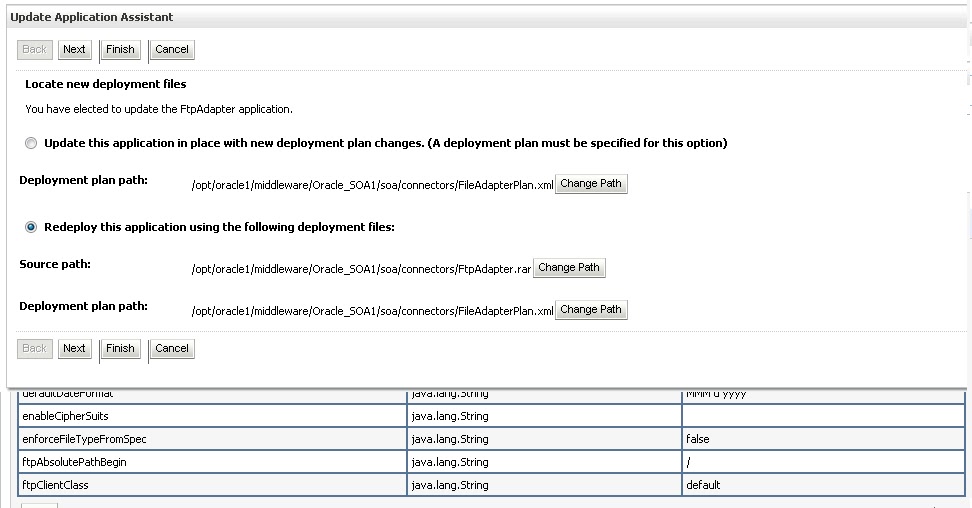
4) After this update the deployment FTPAdpter. Activate the changes. 


After update you get the message that two “However 2 items must be restarted for the changes to take effect.”   There is no need to start the server or no need to stop and start the FTPAdapter deployment. Only Updating the FTPAdapter deployment is enough to make File Adapter working.
5.  FTP adapter Service is ready to used by other SOA components